

What's new
A weekly digest of notable Claude Code features, with code snippets, demos, and context on why they matter.
The weekly dev digest highlights the features most likely to change how you work. Each entry includes runnable code, a short demo, and a link to the full docs. For every bug fix and minor improvement, see the changelog.
Ultraplan enters early preview: draft a plan in the cloud from your CLI, review and comment on it in a web editor, then run it remotely or pull it back local. The first run now auto-creates a cloud environment for you.
Also this week: the Monitor tool streams background events into the conversation so Claude can tail logs and react live, /loop self-paces when you omit the interval, /team-onboarding packages your setup into a replayable guide, and /autofix-pr turns on PR auto-fix from your terminal.
Computer use comes to the CLI in research preview: Claude can open native apps, click through UI, and verify changes from your terminal. Best for closing the loop on things only a GUI can verify.
Also this week: /powerup interactive lessons, flicker-free alt-screen rendering, a per-tool MCP result-size override up to 500K, and plugin executables on the Bash tool's PATH.
Auto mode lands in research preview: a classifier handles your permission prompts so safe actions run without interruption and risky ones get blocked. The middle ground between approving everything and --dangerously-skip-permissions.
Also this week:PR auto-fix on Web, transcript search with /, a native PowerShell tool for Windows, and conditional if hooks.
Week 15 · April 6–10, 2026
Ultraplan cloud planning, the Monitor tool with self-pacing /loop, /team-onboarding for packaging your setup, and /autofix-pr from your terminal.
Kick off plan mode in the cloud from your terminal, then review the result in your browser. Claude drafts the plan in a Claude Code on the web session while your terminal stays free; when it's ready you comment on individual sections, ask for revisions, and choose to execute remotely or send it back to your CLI. As of v2.1.101 the first run auto-creates a default cloud environment, so there's no web setup step before you can try it.
Run the command, or just include the keyword in any prompt:
> /ultraplan migrate the auth service from sessions to JWTs
A new built-in tool that spawns a background watcher and streams its events into the conversation: each event lands as a new transcript message that Claude reacts to immediately. Tail a training run, babysit a PR's CI, or auto-fix a dev server crash the moment it happens, all without a Bash sleep loop holding the turn open.
Ask Claude to watch something while you keep working:
> Tail server.log in the background and tell me the moment a 5xx shows up
This pairs with /loop, which now self-paces: omit the interval and Claude schedules the next tick based on the task, or reaches for the Monitor tool to skip polling altogether.
> /loop check CI on my PR
PR auto-fix landed on the web in Week 13. Now you can turn it on without leaving your terminal: /autofix-pr infers the open PR for your current branch and enables auto-fix for it on Claude Code on the web in one step. Push your branch, run the command, walk away; Claude watches CI and review comments and pushes fixes until it's green.
Run it from the PR's branch:
> /autofix-pr
Generates a teammate ramp-up guide from your local Claude Code usage. Run it in a project you know well and hand the output to a new teammate so they can replay your setup instead of starting from defaults.
Run it from a project you've spent real time in:
> /team-onboarding
Other wins
Ctrl+O in flicker-free mode to collapse the view to your last prompt, a one-line tool summary with diffstats, and Claude's final response/agents gets a tabbed layout: a Running tab shows live subagents with a ● N running count, plus Run agent and View running instance actions in the Library tabhigh for API-key, Bedrock, Vertex, Foundry, Team, and Enterprise users (control with /effort)/cost shows a per-model and cache-hit breakdown for subscription users/release-notes is now an interactive version pickerrefreshInterval setting re-runs the command every N seconds, and workspace.git\_worktree in the JSON inputCLAUDE\_CODE\_PERFORCE\_MODE: Edit/Write fail on read-only files with a p4 edit hint instead of silently overwritingCLAUDE\_CODE\_CERT\_STORE=bundled to opt out)CLAUDE\_CODE\_USE\_MANTLE=1/dev/tcp redirects, and compound commands now prompt correctlyUserPromptSubmit hooks can set the session title via hookSpecificOutput.sessionTitleFull changelog for v2.1.92–v2.1.101 →
Week 14 · March 30 – April 3, 2026
Computer use in the CLI, interactive in-product lessons, flicker-free rendering, per-tool MCP result-size overrides, and plugin executables on PATH.
Last week computer use landed in. This week it's in the CLI: Claude can open native apps, click through UI, test its own changes, and fix what breaks, all from your terminal. Web apps already had verification loops; native iOS, macOS, and other GUI-only apps didn't. Now they do. Best for closing the loop on apps and tools where there's no API to call. Still early; expect rough edges.
Run /mcp, find computer-use, and toggle it on. Then ask Claude to verify a change end to end:
> Open the iOS simulator, tap through onboarding, and screenshot each step
Interactive lessons that teach Claude Code features through animated demos, right inside your terminal. Claude Code releases frequently, and features that would have changed how you work last month can slip by. Run /powerup once and you'll know what's there.
Run it:
> /powerup
Opt into a new alt-screen renderer with virtualized scrollback. The prompt input stays pinned to the bottom, mouse selection works across long conversations, and the flicker on redraw is gone. Unset CLAUDE\_CODE\_NO\_FLICKER to roll back.
Set the env var and restart Claude Code:
export CLAUDE_CODE_NO_FLICKER=1
claude
MCP server authors can now raise the truncation cap on a specific tool by setting anthropic/maxResultSizeChars in the tool's tools/list entry, up to a hard ceiling of 500K characters. The cap used to be global, so tools that occasionally returned inherently large payloads like database schemas or full file trees hit the default limit and got persisted to disk with a file reference. Per-tool overrides keep those results inline when the tool really needs them.
Annotate the tool in your server's tools/list response:
{
  "name": "get_schema",
  "description": "Returns the full database schema",
  "_meta": {
    "anthropic/maxResultSizeChars": 500000
  }
}
Place an executable in a bin/ directory at your plugin root and Claude Code adds that directory to the Bash tool's PATH while the plugin is enabled. Claude can then invoke the binary as a bare command from any Bash tool call, with no absolute path or wrapper script needed. Handy for packaging CLI helpers next to the commands, agents, and hooks that call them.
Add a bin/ directory at the plugin root:
my-plugin/
├── .claude-plugin/
│   └── plugin.json
└── bin/
    └── my-tool
Other wins
PermissionDenied hook fires on classifier denials (return retry: true to let Claude try a different approach), and /permissions → Recent lets you retry manually with rdefer value for permissionDecision in PreToolUse hooks: -p sessions pause at a tool call and exit with a deferred\_tool\_use payload so an SDK app or custom UI can surface it, then resume with --resume/buddy: hatch a small creature that watches you code (April 1st)disableSkillShellExecution setting blocks inline shell from skills, slash commands, and plugin commandscat or sed -n without a separate ReadshowThinkingSummaries: true to restore)claude-cli:// deep links accept multi-line prompts (encoded %0A)Full changelog for v2.1.86–v2.1.91 →
Week 13 · March 23–27, 2026
Auto mode for hands-off permissions, computer use built in, PR auto-fix in the cloud, transcript search, and a PowerShell tool for Windows.
Auto mode hands your permission prompts to a classifier. Safe edits and commands run without interrupting you; anything destructive or suspicious gets blocked and surfaced. It's the middle ground between approving every file write and running with --dangerously-skip-permissions.
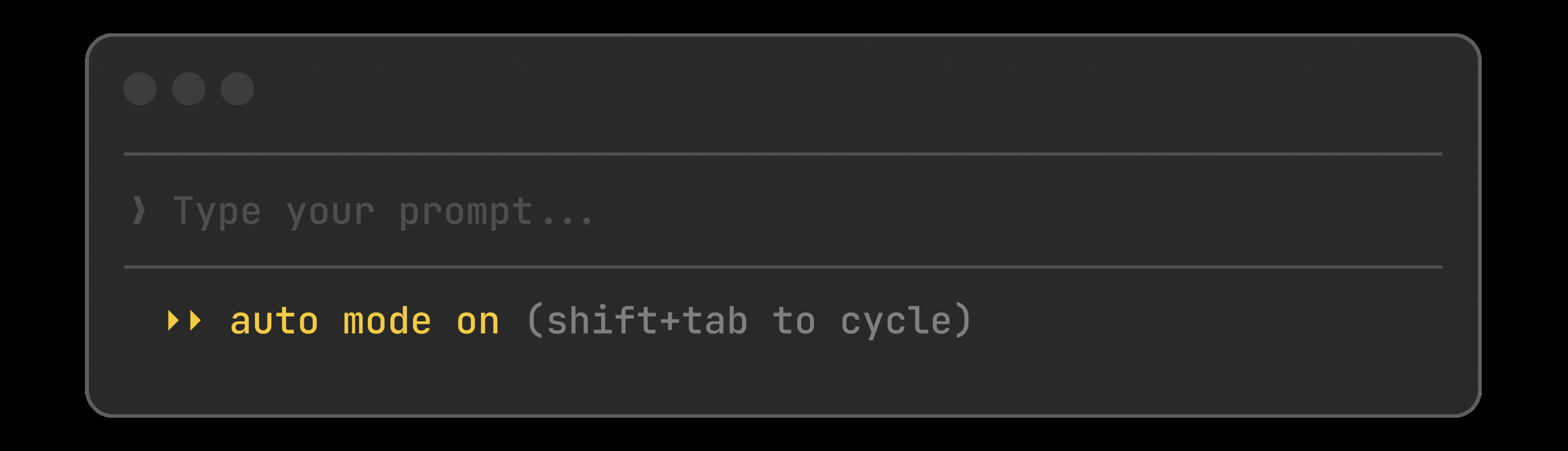
Cycle to auto with Shift+Tab, or set it as your default:
{
  "permissions": {
    "defaultMode": "auto"
  }
}
Flip a switch when you open a PR and walk away. Claude watches CI, fixes the failures, handles the nits, and pushes until it's green. No more babysitting a PR through six rounds of lint errors.
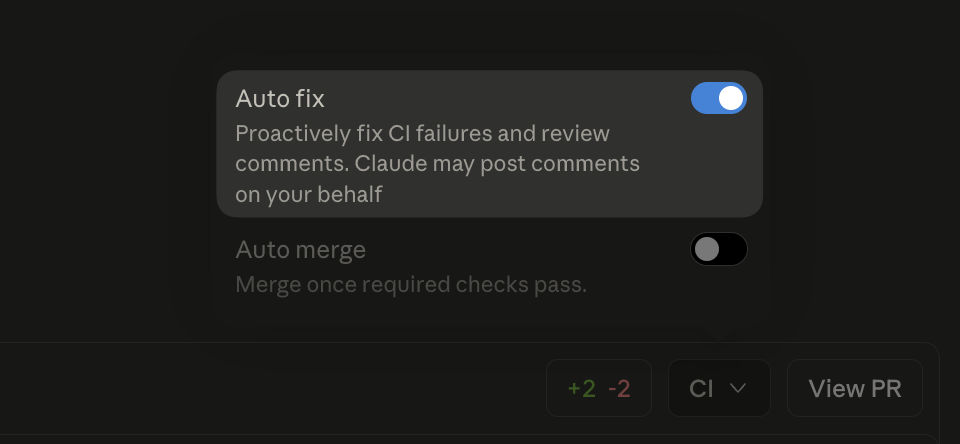
After creating a PR on Claude Code web, toggle Auto fix in the CI panel.
Press / in transcript mode to search your conversation. n and N step through matches. Finally a way to find that one Bash command Claude ran 400 messages ago.
Open transcript mode and search:
Ctrl+O    # open transcript
/migrate  # search for "migrate"
n         # next match
N         # previous match
Windows gets a native PowerShell tool alongside Bash. Claude can run cmdlets, pipe objects, and work with Windows-native paths without translating everything through Git Bash.
Opt in from settings:
{
  "env": {
    "CLAUDE_CODE_USE_POWERSHELL_TOOL": "1"
  }
}
Hooks can now declare an if field using permission rule syntax. Your pre-commit check only spawns for Bash(git commit \*) instead of every bash call, cutting the process overhead on busy sessions.
Scope a hook to git commits only:
{
  "hooks": {
    "PreToolUse": [{
      "hooks": [{
        "if": "Bash(git commit *)",
        "type": "command",
        "command": ".claude/hooks/lint-staged.sh"
      }]
    }]
  }
}
Other wins
userConfig now public: prompt for settings at enable time, keychain-backed secrets\[Image #N] chips you can reference positionallymanaged-settings.d/ drop-in directory for layered policy fragmentsCwdChanged and FileChanged hook events for direnv-style setupsinitialPrompt in frontmatter to auto-submit a first turnCtrl+X Ctrl+E opens your external editor, matching readline/status now works while Claude is responding/clear after 75+ minutes awayFull changelog for v2.1.83–v2.1.85 →